Nero Platinum Suite26.5
Publisher Description
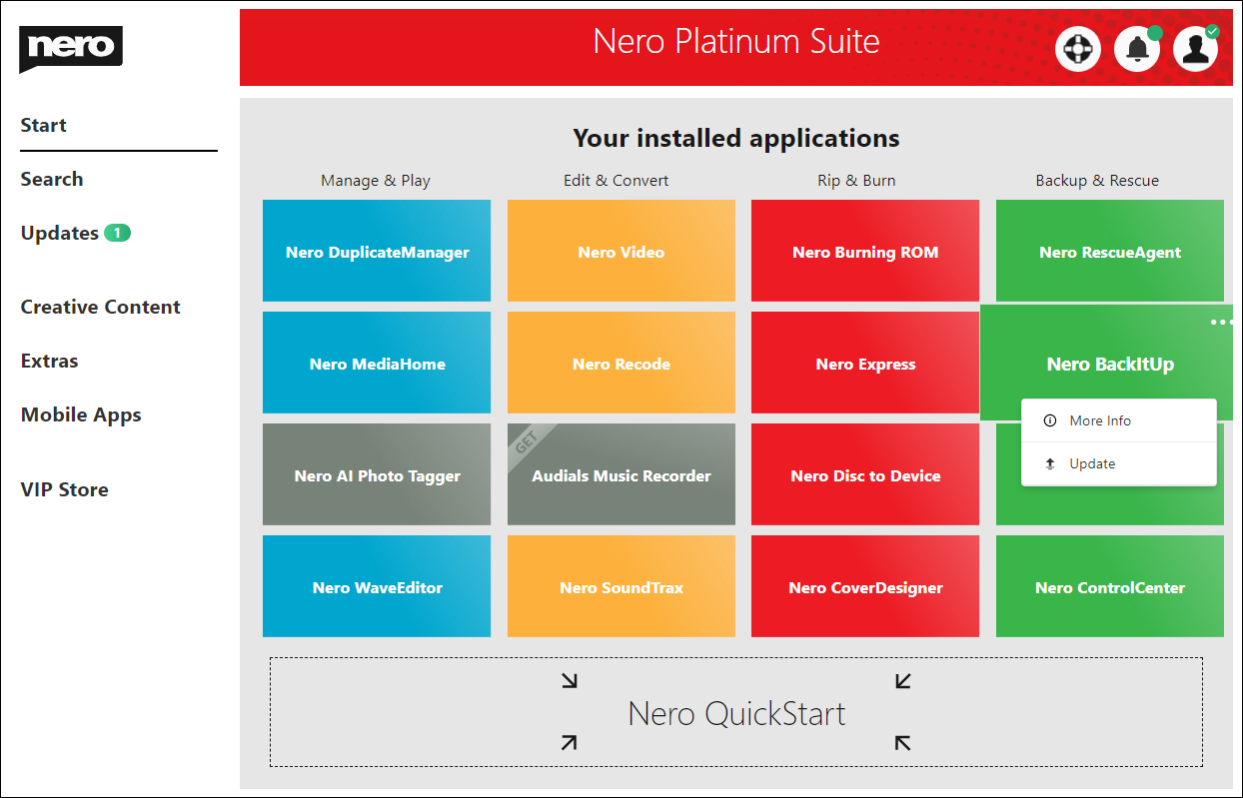
Nero DuplicateManager Photo cleans your photo archive quickly and reliably.
Nero BackItUp
Nero BackItUp quickly and easily backs up your valuable data to an external hard drive, optical media, or the cloud.
Nero Video
Nero Video leaves nothing to be desired when it comes to creating videos and slideshows in an easy, fast and professional way. Get sharper than reality with the 8K playback feature.
Nero Recode
Nero Recode converts and rips videos and music to all standard formats for your mobile devices.
Nero MediaHome
Nero Media Home is the ultimate media organizer. Now featuring a world first: the Nero AI Photo Tagger.
Nero Burning ROM
Nero Burning ROM is still the #1 software for burning and copying data, video, photos, and music to CD, DVD, and Blu-ray Discs.
About Nero Platinum Suite
This Multimedia Creation Tools program is available in English, Chinese, ChineseSimplified, ChineseTraditional, Czech, Danish, Dutch, Finnish, French, German, Greek, Hungarian, Italian, Japanese, Korean, Latin, Norwegian, Polish, Portuguese, Russian, Spanish, Swedish, Thai, Turkish. It was last updated on 29 September, 2026. Nero Platinum Suite is compatible with the following operating systems: Windows.
The company that develops Nero Platinum Suite is Nero AG. The latest version released by its developer is 26.5.
The download we have available for Nero Platinum Suite has a file size of 159.4 MB. Just click the green Download button above to start the downloading process. The program is listed on our website since 2023-12-24 and was downloaded 66 times. We have already checked if the download link is safe, however for your own protection we recommend that you scan the downloaded software with your antivirus. Your antivirus may detect the Nero Platinum Suite as malware if the download link is broken.
How to install Nero Platinum Suite on your Windows device:
- Click on the Download button on our website. This will start the download from the website of the developer.
- Once the Nero Platinum Suite is downloaded click on it to start the setup process (assuming you are on a desktop computer).
- When the installation is finished you should be able to see and run the program.
Program Details
General
System requirements
Download information
Pricing
Version History
version 26.5
posted on 2023-12-24
Create screen recordings according to your ideas with just one click
Easily add clipart or scrolling text to your videos
More upscale models to choose from, support of the popular .webp format
Save your own projects as templates, saving a lot of precious time
And more
version 25.5.62
posted on 2023-07-07
Usability improvement for Nero QuickStart.
Simplize the workflow for some cases.
Fixed a bug when login failed with the updated password.
version 25.5.47
posted on 2023-04-24
Now you can add a second email to your Nero account.
Bug fixes and stability improvements.
version 25.5.43
posted on 2023-04-07
Nero Start: New filters, improved search, and practical video tutorials
Nero Video: Automatically detect and pixelate moving objects with motion tracking
Nero Score: Check your performance and test speed of the hard disk
Nero AI Image Upscaler: More detailed, more precise, with more options
version 25.5
posted on 2023-01-11
Support 8K HEVC in Nero Video
Support 8K HEVC in Nero Recode
Motion tracking is coming to the Nero Video
New Image Upscaler 2.0
Support HEIC/HEIF in Nero MediaHome, AI Photo Tagger, Nero DuplicateManager
A-B Repeat playback in Nero MediaHome
Support Lyrics in Nero MediaHome
And more!
version 24.5.89
posted on 2022-06-29
Features:
Adds Nero Market shortcut into desktop.
Improvements:
Improves the compatibility of the installer.
version 24.5.63
posted on 2022-03-17
This update includes some bug fixes and usability improvements.
version 24.5.2040
posted on 2021-10-28
Improved Windows 11 compatibility.
8K Ultra HD support.
Photo and video enhancement using artificial intelligence.
Nero Image Upscaler - an AI powered tool for sharpening your digital photos.
Nero Score - a tool that allows you to realistically measure your PC's performance.
Updated dashboard.
